mel语初解之二-多边型建模
众所周知,maya的多边形建模能力是不如人意的,因此这时mel会派上很大的用场。相信很多人都用过一些辅助性的建模工具,例如MJPolyTools、BPT、icePolyTools...我在教程中会对这些程序的关键功能的编写方法作出详细说明,希望大家能在掌握这些功能的基础之上编写出自己称心如意的Poly工具。
现在继续mel的教程,如果你对mel还一无所知的话,请看mel语初解之一-基础和界面篇:
http://www.16xx8.com/photoshop/jiaocheng/106791.html
众所周知,maya的多边形建模能力是不如人意的,因此这时mel会派上很大的用场。相信很多人都用过一些辅助性的建模工具,例如MJPolyTools、BPT、icePolyTools、CPS、drawSplit、rockGen...我在教程中会对这些程序的关键功能的编写方法作出详细说明,希望大家能在掌握这些功能的基础之上编写出自己称心如意的Poly工具。
mel作为脚本语言使用非常方便,在工作中会很容易地把你的一些简单想法付诸实践。
在讲Poly建模之前,需要复习一下以前的知识。
首先要复习一下数组(Array):一群变量放到了一起,这群变量就成了一个数组变量。不过这些变量不是随便放的,每个变量都有一个房间,每个房间都有顺次的门牌号,我们就是根据门牌号来访问任何一个数组成员的。请看这个字符串数组的例子:
选择几个场景中的物体。
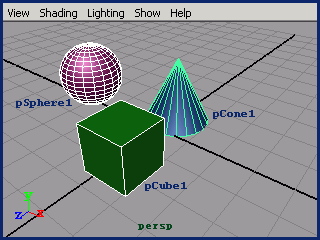
// 获取场景中的每一个物体,分别放入数组$objects的每个房间中
string $objects[] = `ls -sl`;
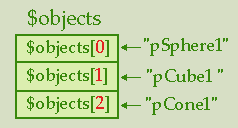
这时数组的状态如图所示。$objects可以看作是公寓的名称,[]里的红色数字为房间的门牌号,也叫作索引号(index)。数组的索引号总是从0开始的。也就是说$objects[0]为数组的第一个成员,它的值为"pSphere1";而$objects[1]为数组的第二个成员,他的值为"pCube1";以此类推。
我们可以从数组中取值,例如:
string $obj = $objects[0];
// 此时变量$obj的值为"pSphere1"
也可以给数组的成员赋值,例如:
$objects[1] = "pBox1";
// 此时数组$objects的值为{"pSphere1", "pBox1", "pCone1"}
要想遍历数组中的每个成员,可以用for语句,有两种方法。
// 方法一
string $objects[] = `ls -sl`;
for ($i = 0; $i < size($objects); $i++)
{
string $obj = $objects[$i];
// do something ...
}
// 方法二
string $objects[] = `ls -sl`;
for ($obj in $objects)
{
// do something ...
}
[注] mel的for...in语句和JavaScript有所不同,$obj是字符串,指的是
当前的数组成员,等同于"string $obj = $objects[$i];"
再复习一下函数(Function):
如果你编写比较复杂的程序,就会发现有很多经常用到的语句,这些语句经常以相同的组合出现。这样的语句编写起来有些麻烦,看起来也不太直观。为了提高工作效率,增加可读性,我们可以使用函数把它们封装起来。下面举例说明。
还记得前面讲过的filterExpand获取多边形面的方法吧?
string $faces[] = `filterExpand -ex 1 -sm 34`;
对初学者来说,看到"-sm 34"后,总是很难联想到多边形的面。当然你可以用maya的全局变量$gSelectMeshFaces来替代34,不过这样做有些麻烦。我们编一个新的函数来做与上面代码同样的事情。
proc string[] getSelFaces()
{
return `filterExpand -ex true -sm 34`;
}
// [注] Sel为Selected的缩写
有了这个函数,我们以后再获取多边形的面时,就可以这样写:string $faces[] = `getSelFaces`;
也可以这样写:string $faces[] = getSelFaces();
return为返回的意思,proc后面的字代表返回值的类型,return后面的字(变量或表达式)代表返回值,也就是函数的输出值。
对初学者来说,看到"-sm 34"后,总是很难联想到多边形的面。当然你可以用maya的全局变量$gSelectMeshFaces来替代34,不过这样做有些麻烦。我们编一个新的函数来做与上面代码同样的事情。
proc string[] getSelFaces()
{
return `filterExpand -ex true -sm 34`;
}
// [注] Sel为Selected的缩写
有了这个函数,我们以后再获取多边形的面时,就可以这样写:string $faces[] = `getSelFaces`;
也可以这样写:string $faces[] = getSelFaces();
return为返回的意思,proc后面的字代表返回值的类型,return后面的字(变量或表达式)代表返回值,也就是函数的输出值。
再看一个例子:
proc string[] getPolySel(string $type)
{
if ($type == "vert")
return `filterExpand -ex true -sm 31`;
if ($type == "edge")
return `filterExpand -ex true -sm 32`;
if ($type == "face")
return `filterExpand -ex true -sm 34`;
// 假如输入参数是非预期的,就返回一个空数组
string $null[];
return $null;
}
想要获取多边形的面时,可以这样写: string $faces[] = getSelFaces("face");
或: string $faces[] = `getPolySel "face"`;
这回用到了函数的输入参数(string $type),根据输入参数的不同,产成不同的返回值。
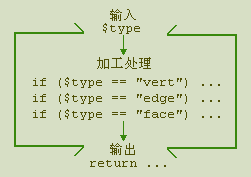
一个函数可以既没有输入参数也没有返回值,也可以只有其一。参数可以是多个,返回值只能是一个。
return语句执行之后,后面的语句将不再执行。例如:
proc myProc()
{
// 获取选择的物体
string $objects[] = `ls -sl`;
// 如果什么都没选择,就返回(什么也不做)。
if (!size($objects))
return;

// do something ...
}
proc myProc()
{
// 获取选择的物体
string $objects[] = `ls -sl`;
// 如果什么都没选择,就返回(什么也不做)。
if (!size($objects))
return;

// do something ...
}
或: string $faces[] = `getPolySel "face"`;
这回用到了函数的输入参数(string $type),根据输入参数的不同,产成不同的返回值。
一个函数可以既没有输入参数也没有返回值,也可以只有其一。参数可以是多个,返回值只能是一个。
return语句执行之后,后面的语句将不再执行。例如:
proc myProc()
{
// 获取选择的物体
string $objects[] = `ls -sl`;
// 如果什么都没选择,就返回(什么也不做)。
if (!size($objects))
return;

// do something ...
}
proc myProc()
{
// 获取选择的物体
string $objects[] = `ls -sl`;
// 如果什么都没选择,就返回(什么也不做)。
if (!size($objects))
return;

// do something ...
}
global proc和proc的区别
proc是局部函数,局部函数只能在编写这个函数的mel文件中使用,不能在其他mel文件中使用,不能作为菜单和按钮命令,不占用内存空间。
global proc是全局函数,没有proc那些局限。使用全局函数应注意,函数名不能与Maya中已有的全局函数或mel命令相同,否则会把原来的覆盖掉,可以通过使用函数名前缀来避免重复命名。关于全局函数的使用,最好了解一些Maya的运行方式。Maya启动时一般只把指定scripts路径中的*.mel文件名(*)载入内存,这样Maya运行时就可以调用这个文件中的同名函数,而当调用这个同名函数时,这个mel文件中的所有全局函数将被载入内存,直到Maya退出。
如果还不明白,那就统统使用global proc好了,没什么大不了的。
下面提供几个多边形建模常用到的函数,因为后面经常用到,所以应该熟练掌握,至少对于每个函数做什么事要很清楚。
// 获取选择的多边形顶点
proc string[] getSelVerts()
{
return `filterExpand -ex true -sm 31`;
}
// 获取选择的多边形边
proc string[] getSelEdges()
{
return `filterExpand -ex true -sm 32`;
}
// 获取选择的多边形面
proc string[] getSelFaces()
{
return `filterExpand -ex true -sm 34`;
}
// 获取选择的多边形UV点
proc string[] getSelUVs()
{
return `filterExpand -ex true -sm 35`;
}
用法范例:
// 获取选择的所有面,存放到数组$faces[]中
string $faces[] = getSelFaces();
    这四个函数是maya内置的,也是菜单命令,经常用到。

// 菜单命令:Edit Polygons->Selection->Convert Selection to Vertices
// 转换当前选择为顶点
ConvertSelectionToVertices();

// 菜单命令:Edit Polygons->Selection->Convert Selection to Edges
// 转换当前选择为边
ConvertSelectionToEdges();

// 菜单命令:Edit Polygons->Selection->Convert Selection to Faces
// 转换当前选择为面
ConvertSelectionToFaces();

// 菜单命令:Edit Polygons->Selection->Convert Selection to UVs
// 转换当前选择为UV点
ConvertSelectionToUVs();
用法范例:
// 获取选择的所有面,存放到数组$faces[]中
string $faces[] = getSelFaces();
    这四个函数是maya内置的,也是菜单命令,经常用到。

// 菜单命令:Edit Polygons->Selection->Convert Selection to Vertices
// 转换当前选择为顶点
ConvertSelectionToVertices();

// 菜单命令:Edit Polygons->Selection->Convert Selection to Edges
// 转换当前选择为边
ConvertSelectionToEdges();

// 菜单命令:Edit Polygons->Selection->Convert Selection to Faces
// 转换当前选择为面
ConvertSelectionToFaces();

// 菜单命令:Edit Polygons->Selection->Convert Selection to UVs
// 转换当前选择为UV点
ConvertSelectionToUVs();
这四个函数在maya的scripts/others目录中,可以直接调用。
// 转换当前选择为顶点,并获取这些顶点的名称
global proc string[] getVerts()
{
select -r `polyListComponentConversion -tv`;
string $result[]=`filterExpand -ex true -sm 31`;
return $result;
}

// 转换当前选择为边,并获取这些点的名称
global proc string[] getEdges()
{
select -r `polyListComponentConversion -te`;
string $result[]=`filterExpand -ex true -sm 32`;
return $result;
}

// 转换当前选择为面,并获取这些面的名称
global proc string[] getFaces()
{
select -r `polyListComponentConversion -tf`;
string $result[]=`filterExpand -ex true -sm 34`;
return $result;
}

// 转换当前选择为UV点,并获取这些UV点的名称
global proc string[] getUVs()
{
string $uvs[];
$uvs=`polyListComponentConversion -tuv`;
if (size($uvs) == 0) return $uvs;
select -r $uvs;
string $result[]=`filterExpand -ex true -sm 35`;
return $result;
}
// 根据点、边、面、UV点的名称得出多边形的名称
// 例如多边形一条边的名称为"pSphere1.e[637]",则这个多边形的
// 名称为"pSphere1"
proc string getBaseName(string $item)
{
string $buffer[];
if ($item != "")
{
tokenize($item, ".", $buffer);
}
return $buffer[0];
}
用法范例:
string $polyName = getBaseName("pSphere1.e[637]");
// 返回值:pSphere1// 根据点、边、面、UV点的名称得出它们的索引号
// 例如多边形一条边的名称为"pSphere1.e[637]",则这个多边形的
// 索引号为637
proc int getIndex(string $indexString)
{
string $buffer[];
tokenize($indexString, "[]", $buffer);
int $index = (int)$buffer[1];
return $index;
}
用法范例:
int $index = getIndex("pSphere1.e[637]");
// 返回值:637
首先介绍一个有用的函数(intersectStringArray)。这个函数可以找到两个数组的共同部分,比如数组1为{"兔子", "老虎", "山羊", "虫子"},数组2为{"虫子", "刀子", "梳子", "兔子", "珠子"},你可以获得一个新数组包含它们的共同部分{"兔子", "虫子"}。
// 获得两个数组的共同部分
proc string[] intersectStringArray(string $array1[], string $array2[])
{
global string $m_arrayIntersector;
if ($m_arrayIntersector == "")
$m_arrayIntersector = `stringArrayIntersector`;

stringArrayIntersector -edit -intersect $array1 $m_arrayIntersector;
stringArrayIntersector -edit -intersect $array2 $m_arrayIntersector;
string $result[] = `stringArrayIntersector -query $m_arrayIntersector`;
stringArrayIntersector -edit -reset $m_arrayIntersector;
return $result;
}
    [注] global string代表一个全局字符串变量,以前讲过全局变量应当尽量避免命名冲突。maya中的全局变量都是以
小写字母"g"开头,为避免冲突,本教程中的全局变量一律使用"m_"作为前缀。
    前面介绍过的函数可以看作是工具函数,这些函数几乎在以后的每个程序中都要用到。如果编写某一功能,还需要编写
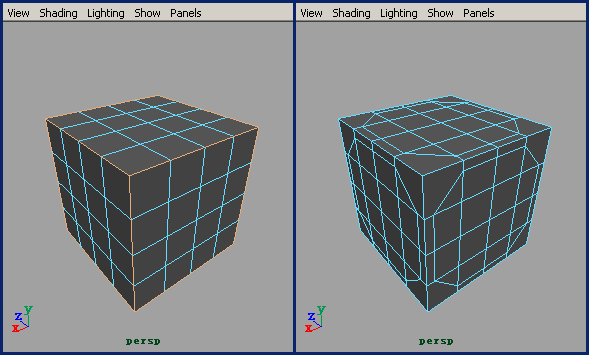
一些有针对性的专用函数。现在我们来编一个多边形的导角功能,来看看一个完整的程序是怎样完成的。
学习 · 提示
相关教程